Table of Contents
- Introduction: Defining Vandalism-Proofing and its Importance
- Understanding Your Router’s Role in Vandalism-Proofing
- Implementing the ‘No-Loiter’ Strategy for Optimal Performance
- Adjusting Upload Speeds to Cater to Short-Term Users
- Throttling Long-Term Streaming to Discourage Non-Customers
- Conclusion: Securing Your Wi-Fi with a ‘No-Loiter’ Approach
Introduction: Defining Vandalism-Proofing and its Importance
Defining Vandalism-Proofing and its Importance
In today’s hyper-connected digital world, ensuring the security and efficiency of your Wi-Fi network is crucial for both personal and professional use. While many might associate vandalism with physical damage to property, the term can also be applied to digital spaces – specifically, your Wi-Fi network. In this article, we will explore how to ‘vandalism-proof’ your Wi-Fi by implementing a strategic approach that optimizes your internet experience while discouraging non-paying users from hogging valuable bandwidth.
Understanding Your Router’s Role in Vandalism-Proofing
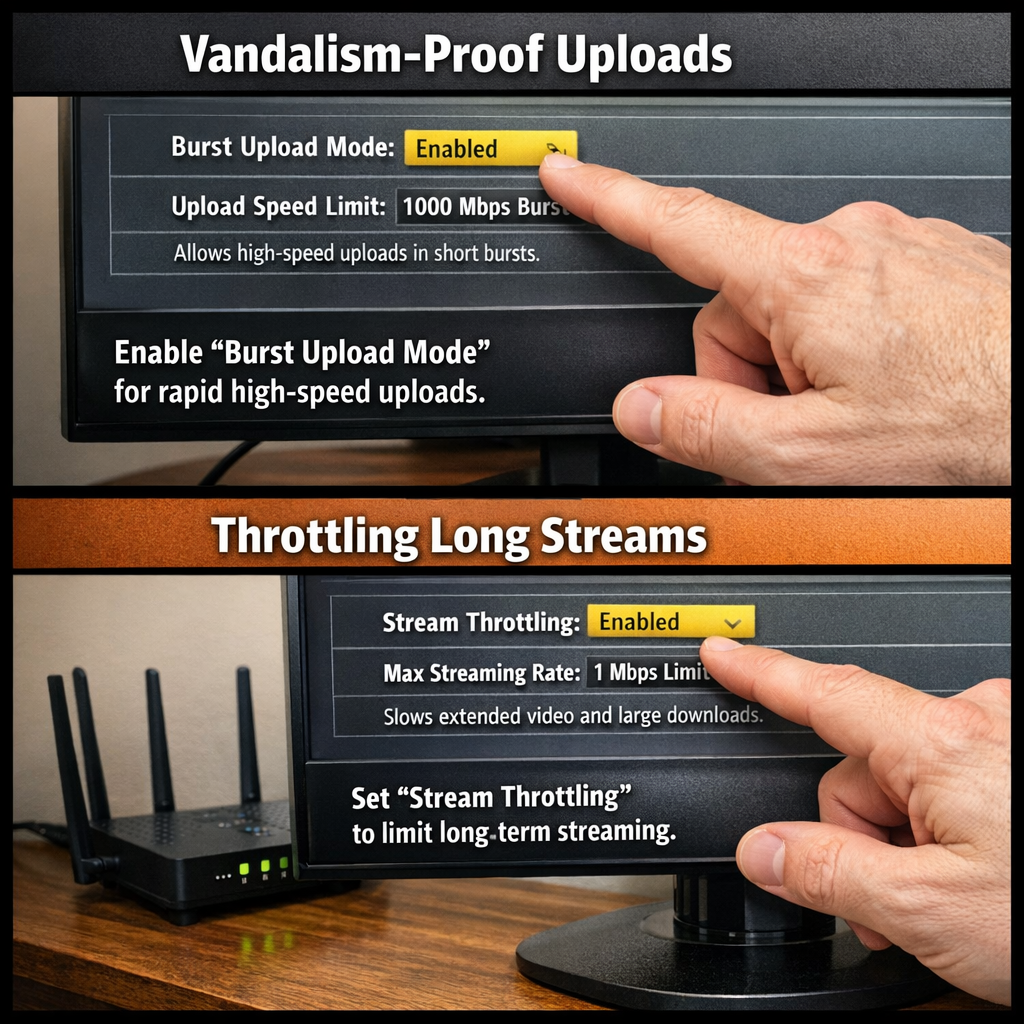
Your router plays a critical role in preventing vandalism of your digital space, as it acts as the gatekeeper for incoming and outgoing network traffic. By configuring your router’s quality of service (QoS) settings, you can create a strategy that prioritizes high-speed bursts for uploads, such as those used in creating and sharing content on social media platforms like TikTok and Instagram, while throttling long-term streaming to discourage non-customers from camping in your digital space.
- Firstly, understand the difference between upload and download speeds. Upload speed refers to the rate at which data is sent from your device to the internet, whereas download speed is the rate at which data is received from the internet to your device. Prioritizing uploads ensures that users can quickly share content without experiencing buffering or lag.
- Secondly, familiarize yourself with your router’s QoS settings. Most modern routers have built-in QoS tools that allow you to prioritize certain types of network traffic over others. This feature is typically found under the advanced settings menu and may be labeled as ‘QoS,’ ‘Advanced QoS,’ or a similar name.
- Thirdly, configure your router to prioritize uploads over long-term streaming. By setting a higher upload speed limit for short bursts of network activity, you can encourage users to engage with your content quickly while still throttling non-customers who may attempt to use your digital space as a persistent connection point.
By understanding the role your router plays in vandalism-proofing and implementing these simple steps, you can create a more engaging and secure digital environment for your users.
Implementing the ‘No-Loiter’ Strategy for Optimal Performance
Implementing the ‘No-Loiter’ Strategy for Optimal Performance
To effectively implement the ‘No-Loiter’ strategy, it is essential to understand its core principles and apply them in your digital setup.
- Establish a tiered access system: Create multiple SSID networks with varying levels of encryption and speed caps. This allows you to cater to different user groups and prevent excessive usage by non-paying customers.
- Set up time-limited guest accounts: When visitors request access, provide them with temporary credentials that grant them access for a limited period. Once the time expires, they will be automatically disconnected, preventing long-term loitering.
- Implement traffic shaping: Prioritize bandwidth allocation based on user activity and device type. For example, give priority to devices used for short bursts of uploads (e.g., TikTok or Instagram) while throttling slower-streaming devices like smart TVs or gaming consoles.
By following these steps, you can effectively create a ‘No-Loiter’ digital environment that maintains optimal performance and prevents non-customers from abusing your network’s resources.
Adjusting Upload Speeds to Cater to Short-Term Users
Adjusting upload speeds to cater to short-term users can be achieved by implementing a tiered internet plan on your router. This strategy allows for high-speed bursts for activities such as uploading content to social media platforms like TikTok and Instagram, while throttling long-term streaming to discourage non-customers from taking advantage of the service.
- Firstly, identify the difference between short-term users and long-term users. Short-term users are those who use your internet for brief periods, such as uploading content or browsing the web quickly. Long-term users are individuals who consistently stream high-bandwidth content, like streaming movies or playing online games.
- Next, establish a tiered system for internet usage. Create a policy that allows for higher upload speeds during short bursts of activity while limiting the speed for long-term streaming sessions.
- Configure your router to prioritize short-term users over long-term users. This can be done by setting different upload speed limits for each group, ensuring that those who use your internet in moderation receive faster speeds than those who abuse the service.
- Monitor and adjust your tiered system as needed. Continuously review usage patterns and make changes to the policy as necessary to ensure the best possible experience for all users.
This ‘no-loiter’ digital strategy can significantly reduce instances of vandalism-proofing by discouraging non-customers from taking advantage of your internet service, ultimately protecting your business and maintaining a positive user experience for those who pay for your services.
Throttling Long-Term Streaming to Discourage Non-Customers
Throttling Long-Term Streaming to Discourage Non-Customers
To implement a successful ‘no-loiter’ digital strategy, it’s crucial to understand how to effectively throttle long-term streaming on your Wi-Fi network. By doing so, you can deter non-customers from taking advantage of your high-speed bursts for uploads (TikTok/Instagram) and encourage them to become paying customers.
- Firstly, familiarize yourself with the QoS (Quality of Service) settings on your router. These settings allow you to prioritize certain types of internet traffic over others, ensuring that your high-speed bursts are reserved for paying customers while still providing adequate service to non-customers.
- Next, consider implementing a ‘fair usage policy’ that limits the amount of data non-customers can consume within a specific time frame. This encourages them to either upgrade to a higher-tiered plan or seek out alternative Wi-Fi sources.
- Another effective method is to set up ‘guest networks’ for visitors and non-customers, ensuring they have access to your Wi-Fi but at a lower speed cap than paying customers. This discourages long-term streaming by non-customers while still offering a basic level of service for their temporary use.
- Finally, regularly monitor your network traffic to identify any suspicious activity or excessive data usage by non-customers. By promptly addressing these issues and enforcing your ‘no-loiter’ policy, you can maintain a high-quality Wi-Fi experience for your paying customers.
Conclusion: Securing Your Wi-Fi with a ‘No-Loiter’ Approach
Conclusion: Securing Your Wi-Fi with a ‘No-Loiter’ Approach
In today’s fast-paced digital world, securing your Wi-Fi network has become more important than ever. With the rise of online content creators and the increasing demand for high-speed internet, it is crucial to implement a strategy that allows you to offer optimal service while preventing non-customers from taking advantage of your resources.
The ‘No-Loiter’ approach is an effective way to manage your Wi-Fi network and ensure that only those who need it are using it. By configuring your router to prioritize short bursts of high-speed data for uploads, you can cater to the needs of content creators without allowing anyone to take up valuable bandwidth for extended periods.
In conclusion, implementing a ‘No-Loiter’ strategy is essential for protecting your Wi-Fi network from misuse and ensuring that it remains a valuable resource for those who truly need it. So, why not give this approach a try and see the difference it makes in maintaining a secure and efficient digital environment?
Leave a Reply